

For the last two weeks, my Claude Max account had been acting weird. I’m on the 20x plan, and the weekly limits, both the all-models one and the Fable one, typically last me 5 to 6 days. I almost never hit the 5-hour window. Then usage started running out way faster than it should. I hit the weekly limit in 2 days with a similar amount of work, and started hitting the 5-hour window within an hour. This Monday, I hit it in 10 minutes.
That surprised me, so I did some quick research. Turns out there are a lot of threads about exactly this: people hitting Claude Code usage limits way faster than expected, everyone convinced the meter is wrong, nobody able to prove it either way. So I assumed it was a bug on Anthropic’s side, and I was about to switch to Codex.
But one thing bugged me. Hundreds of people with the same complaint, and not one of them could actually answer the question “where did my tokens go?” Neither could I. The only built-in way to check your Claude usage limit, the /usage screen, shows you a percentage bar and nothing else. Not which project, not which session, not what the tokens were spent on. So before switching, I decided to find out properly.
Claude Code logs every request on your machine
Something most people don’t know: Claude Code keeps a log of every request it makes, locally. Every message, every token count, every model, with timestamps. It all sits in a folder in your home directory.
So the answer to “where did my usage go” was already on my laptop. I just had to read it.
I asked Claude itself to help me dig through its own logs. One warning if you ever try this by hand, or if you’re comparing numbers from ccusage or other token counters: the log format repeats each API response several times, so naive counting overstates your token usage by around 86%. You have to deduplicate by request id, and not every tool does.
We wrote a small script, parsed a month of logs, and started asking questions.
1,555 hidden sessions in one day
The first pass already smelled wrong. My week of Jul 29 to Aug 3 was about 190 million tokens. The week after was 1.22 billion. Six times more, and I hadn’t changed anything about how I work.
Then we zoomed into the day of the lockout, and Claude put it plainly:
Found it. This isn’t a metering bug. Something is running Claude Code as a swarm.
The numbers were absurd. On that one day there were 1,555 seperate Claude Code sessions on my machine. The median session lasted 30 seconds and made 4 requests. At 19:54 there were 51 sessions running at the same time. At peak, my laptop was firing about 190 API requests per minute.
That is not a human. I type slower than that.
For contrast, there was exactly one session that day that looked like a person: 82 requests spread over five hours. That was me, actually coding. My real work was 9% of the day. The other 91% was a machine.
So what was it? A coding agent that some friends of mine are building, from the current YC batch. I had set it up to do background work in one of our project repos and honestly forgot how it worked under the hood. It spawns fresh Claude Code sessions in parallel, in bursts. It ran twice that day, and thousands of times that week.
So, no bug and no broken meter. Just my own robot eating my plan.
So much for switching to Codex.
Why ten minutes: how Claude Code usage limits actually work
Finding the culprit still didn’t explain how you hit a usage limit ten minutes after starting. Two things explain that.
The limit is a rolling window, not a daily bucket. The 5-hour limit counts everything from the last five hours, whether you were at the keyboard or not. The weekly limit works the same way over seven days. When I started that evening at 19:46, the robot’s afternoon run was still inside my window, so it was already 83% full before I typed a single word. I didn’t burn my quota in ten minutes. Most of it was already gone before I started.
Most of what a session costs is the container, not the contents. Every time Claude sends a message, it re-sends the whole conversation so far. The files it read, the history, all of it, every single turn. This is what prompt caching is for, and over my month, 87% of all tokens were exactly this, the same context shipped again and again. A swarm makes it brutally expensive in a different way: every fresh session has to build its cache from nothing, and building costs about 12 times more than re-reading. Fifteen hundred fresh sessions means fifteen hundred contexts built from scratch. That was 33 million tokens of pure setup in a single afternoon.
There’s a name for the weight of a container that you subtract to find what’s actually inside. It’s called tare. It’s the button on a kitchen scale that zeroes out the bowl so you only weigh the flour.
tare: a Claude Code skill that reads your usage logs
The investigation took two days of manual digging. That felt wrong, because everything we did was repeatable, and all those people on Reddit have the same logs sitting on their machines.
So we turned it into a tool, and named it tare.
It’s a skill for Claude Code. You install it once, and then you just ask, in plain English, in any session:
- Why did I hit my usage limit yesterday?
- Which of my projects is eating my quota?
- Is something running Claude Code in the background?
- Is it safe to start a big refactor right now, or is my window still full?
- Make me a usage report I can open in my browser.
- Export my usage to a spreadsheet.
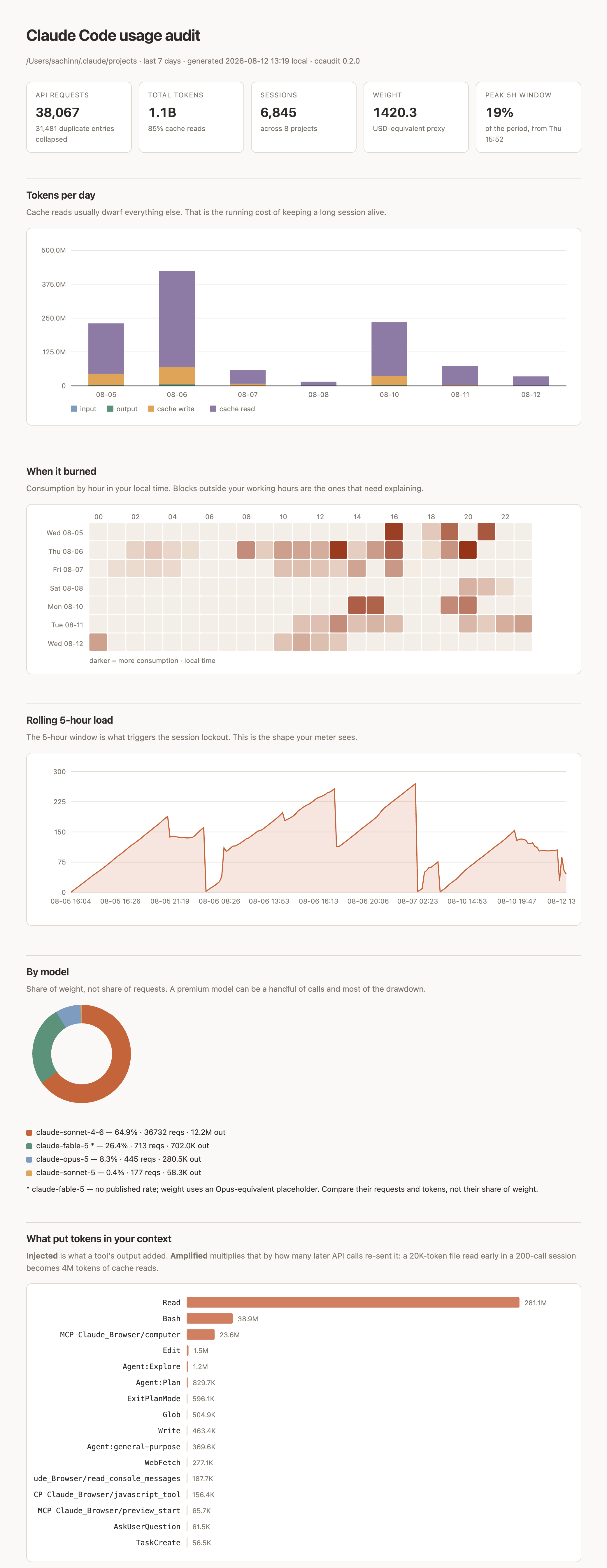
Claude reads its own logs and answers with a cause, not a spreadsheet. There’s also a little dashboard, a HTML usage report with charts, and a scrubbed summary file you can post publicly to ask “is this normal?” without leaking a single prompt or file name.
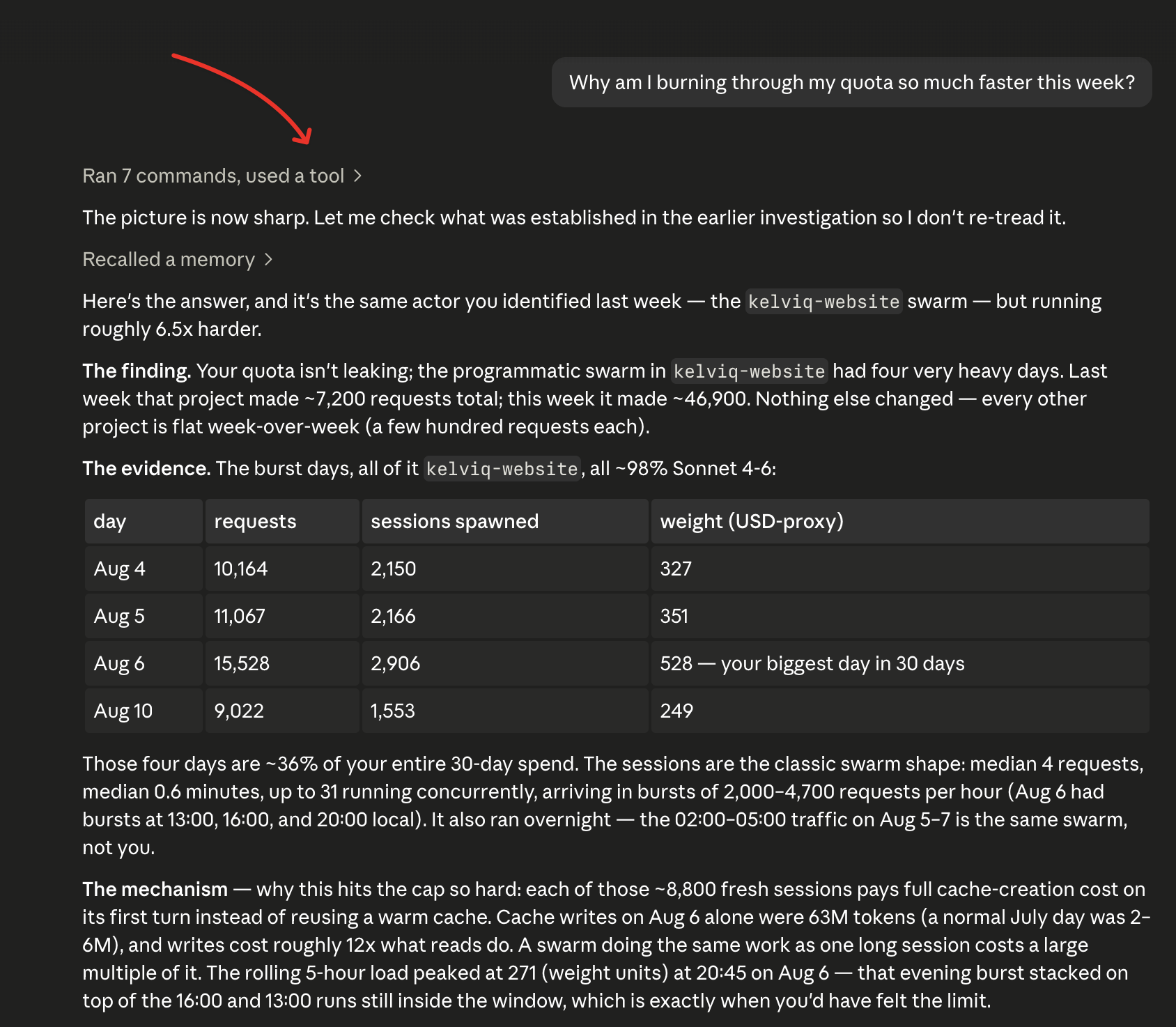
One design choice I care about: the tool is built to be able to say “nothing is wrong.” Most diagnostic tools only know how to find problems. This one will happily tell you your token usage is normal and boring. Mine is a good example. There was never a metering bug, just a rolling window nobody explains and a robot I forgot about.
It caught two things I had missed
Two things happened while testing that sold me on it.
First, it re-opened a case I thought was closed. For two days we’d been calling one 2,705-request session a runaway agent loop. The tool’s session deep-dive showed it was actually legitimate work spread over eight days, resumed 22 times, and that my habit of resuming old sessions instead of starting fresh had cost about 3.4 million tokens in rebuilt context. It turned “use /clear between tasks” from generic advice into a personal number.
Second, once the robot was gone, it correctly identified the new biggest spender on my machine: the session where we were building the tool itself. A usage tool that bills itself honestly. Fair enough.
Nothing leaves your machine
One thing to be clear about, because a tool that reads your entire Claude history deserves suspicion. Everything runs locally. The scripts make zero network calls, and you don’t have to trust me on that: the repo has a SECURITY.md that shows the one grep command that proves it. The only file designed to be shared is scrubbed by construction. No prompts, no file paths, no session ids, nothing.
Try it: see where your Claude Code tokens go
The whole install is one line:
npx skills add kelviq/tare -g -y --copy --agent claude-code
Then open a new Claude Code session and ask:
Where did my tokens actually go this week?
It took me two days to answer that. It should take you about two minutes. And if enough people share their scrubbed summaries, we can eventually answer the question no single person can: what does normal usage even look like?
The code is open source at github.com/kelviq/tare. If it finds a robot in your logs, I’d genuinely love to hear about it.